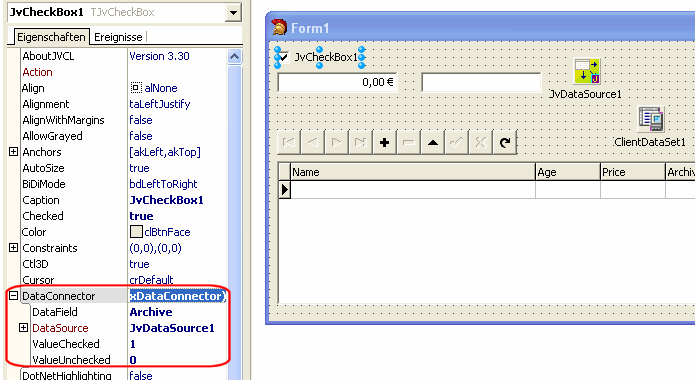
There are two different kinds of JVCL controls. One that support the TDataSource
component and start with the TJvDB prefix. And the other that do not show their
data binding in the name. The TJvDB controls can be connected to a DataSet by
simply setting their DataSource property to a TDataSource. But the more interesting
controls are the so called JvDataSource-aware controls.
These components have a DataConnector property that handles the data binding for
the control.
The DataConnector does not depend on any database code. This allows the component to be data aware when you have a Delphi/BCB/BDS SKU that has the DB.pas unit and to use the component without a DataSet when you have a Personal Edition. This is made possibile by the IJvDataSource interface that is used by the DataConnector to communicate with the TJvDataSource component. The TJvDataSource implements the IJvDataSource interface what TDataSource doesn't do. So it is only possible to connect the DataConnector to a TJvDataSource.
The following components have a DataConnector property:
There are the following predefined DataConnectors available:
As an example the TEdit should be made JvDataSource aware.
The TEditExDataConnector class connects the FieldDataConnector to the TEditEx class.typeTEditEx =class; TEditExDataConnector =class(TJvFieldDataConnector)privateFEdit: TEditEx;protectedprocedureRecordChanged;override;procedureUpdateData;override;propertyEdit: TEditExreadFEdit;publicconstructorCreate(AEdit: TEditEx);end;
constructorTEditExDataConnector.Create(AEdit: TEditEx);begininheritedCreate; FEdit := AEdit;end;procedureTEditExDataConnector.RecordChanged;beginifField.IsValidthenbeginFEdit.ReadOnly :=notField.CanModify; FEdit.Text := Field.AsString;endelsebeginFEdit.Text :=''; FEdit.ReadOnly := True;end;end;procedureTEditExDataConnector.UpdateData;beginField.AsString := FEdit.Text; FEdit.Text := Field.AsString;// update to stored valueend;
TEditEx =class(TEdit)privateFDataConnector: TEditExDataConnector;procedureSetDataConnector(constValue: TEditExDataConnector);protectedprocedureKeyPress(varKey: Char);override;procedureDoExit;override;procedureChange;override;functionCreateDataConnector: TEditExDataConnector;virtual;publicconstructorCreate(AOwner: TComponent);override;destructorDestroy;override;publishedpropertyDataConnector: TEditExDataConnectorreadFDataConnectorwriteSetDataConnector;end;
The next step is to add the new DataConnector class to the TEdit control. For this we need
a DataConnector property that has a setter method. Without the setter Delphi would not store the
properties of the DataConnector to the DFM/NFM/XFM. The virtual CreateDataConnector method allow
decendants to implement an own DataConnector class.
In the KeyPress method we test if the user has pressed the ESCAPE key and reset the control's data
by calling the DataConnector.Reset method.
In the Change method we inform the data source that we want to edit it's data.
The
The DataConnector ignores all actions if no JvDataSource is connected to it.
constructorTEditEx.Create(AOwner: TComponent);begininheritedCreate(AOwner); FDataConnector := CreateDataConnector;end;destructorTEditEx.Destroy;beginFDataConnector.Free;inheritedDestroy;end;functionTEditEx.CreateDataConnector: TEditExDataConnector;beginResult := TEditExDataConnector.Create(Self);end;procedureTEditEx.SetDataConnector(constValue: TEditExDataConnector);beginifValue <> FDataConnectorthenFDataConnector.Assign(Value);end;procedureTEditEx.Change;beginDataConnector.Modify;inheritedChange;end;procedureTEditEx.DoExit;beginDataConnector.UpdateRecord;inheritedDoExit;end;procedureTEditEx.KeyPress(varKey: Char);begininheritedKeyPress(Key);if(Key =#27)andDataConnector.ActivethenbeginDataConnector.Reset; Key :=#0;end;end;
In this case we use a TJvFieldDataConnector because the ListBox should display the field values. The ListBox is used as a navigator and as such it does not need to update any data to the data source.
typeTJvCustomListBoxDataConnector =class(TJvFieldDataConnector)privateFListBox: TCustomListBox; FMap: TList; FRecNoMap: TBucketList;protectedprocedurePopulate;virtual;procedureActiveChanged;override;procedureRecordChanged;override;propertyListBox: TCustomListBoxreadFListBox;publicconstructorCreate(AListBox: TCustomListBox);destructorDestroy;override;procedureGotoCurrent;end;
The Populate method iterates the data source's records and fills the Items property of the ListBox.
The GotoCurrent method is called by the CM_CHANGED message handler of the ListBox which is invoked
when the ItemIndex has changed.
The two maps are used to find the record and the list item.
constructorTJvCustomListBoxDataConnector.Create(AListBox: TCustomListBox);begininheritedCreate; FListBox := AListBox; FRecNoMap := TBucketList.Create; FMap := TList.Create;end;destructorTJvCustomListBoxDataConnector.Destroy;beginFMap.Free; FRecNoMap.Free;inheritedDestroy;end;procedureTJvCustomListBoxDataConnector.ActiveChanged;beginPopulate;inheritedActiveChanged;end;procedureTJvCustomListBoxDataConnector.GotoCurrent;beginifField.IsValidand(FListBox.ItemIndex <> -1)thenDataSource.RecNo := Integer(FMap[FListBox.ItemIndex]);end;
The ActiveChanged method populates the list when the DataSource' state has changed.
By setting DataSource.RecNo the
procedureTJvCustomListBoxDataConnector.RecordChanged;varIndex: Integer;beginifField.IsValidthenbeginifFListBox.Items.Count <> DataSource.RecordCountthenPopulateelseifFRecNoMap.Find(TObject(DataSource.RecNo), Pointer(Index))thenbeginFListBox.Items[Index] := Field.AsString; FListBox.ItemIndex := Index;end;end;end;
The RecordChanged event either populates the list again if a new record was inserted or a record was deleted, or it updates the list item with a new value and selects the current record.
procedureTJvCustomListBoxDataConnector.Populate;varIndex: Integer;beginFMap.Clear; FRecNoMap.Clear; FListBox.Items.BeginUpdate;tryFListBox.Items.Clear;ifField.IsValidthenbeginDataSource.BeginUpdate;tryDataSource.First;whilenotDataSource.EofdobeginIndex := FListBox.Items.Add(Field.AsString); FMap.Add(TObject(DataSource.RecNo)); FRecNoMap.Add(TObject(DataSource.RecNo), TObject(Index)); DataSource.Next;end;finallyDataSource.EndUpdate;end;ifFRecNoMap.Find(TObject(DataSource.RecNo), Pointer(Index))thenFListBox.ItemIndex := Index;end;finallyFListBox.Items.EndUpdate;end;end;
The Populate method fills the list and builds the two maps. Because it wouldn't be a lot of flicker if when the DataDource's records are iterated, the Populate method uses the DataSource.BeginUpdate and DataSOurce.EndUpdate methods. Those save the current record number and disable the controls.
typeTListBoxEx =class(TListBox)privateFDataConnector: TJvCustomListBoxDataConnector;procedureSetDataConnector(constValue: TJvCustomListBoxDataConnector);protectedfunctionCreateDataConnector: TJvCustomListBoxDataConnector;virtual;procedureCMChanged(varMessage: TCMChanged); message CM_CHANGED;publicconstructorCreate(AOwner: TComponent);override;destructorDestroy;override;publishedpropertyDataConnector: TJvCustomListBoxDataConnectorreadFDataConnectorwriteSetDataConnector;end;{ TListBoxEx }constructorTListBoxEx.Create(AOwner: TComponent);begininheritedCrreate(AOwner); FDataConnector := CreateDataConnector;end;destructorTListBoxEx.Destroy;beginFDataConnector.Free;inheritedDestroy;end;functionTListBoxEx.CreateDataConnector: TJvCustomListBoxDataConnector;beginResult := TJvCustomListBoxDataConnector.Create(Self);end;procedureTListBoxEx.CMChanged(varMessage: TCMChanged);begininherited; DataConnector.GotoCurrent;end;procedureTListBoxEx.SetDataConnector(constValue: TJvCustomListBoxDataConnector);beginifValue <> FDataConnectorthenFDataConnector.Assign(Value);end;