
Dear Buyer, thank you for purchasing Clickr landing page. If you have any questions that are beyond the scope of this help file, please feel free to email via my user page contact form here. Thanks so much!
Clickr is a Click through landing page with minimalist design and above-the-fold layout. The main idea behind such design is – Read the offer and Click to buy.
Clickr comes with three page templates:
1. Default template with product image, or video embed code.
2. A template with jquery cycle slider
3. A template with any of the above styles and page content with e-mail subscribe form.
You can use any of these templates according to your product offer and requirements.
Clickr is a fixed HTML layout with 1 Column, header and footer. The design hierarchy can be divided into 4 main sections, as listed below:
These sections can be seen in HTML markup as:
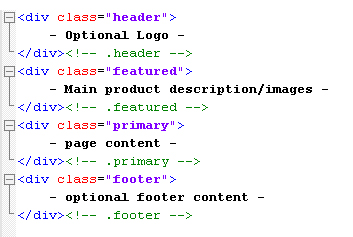
The default template uses first three sections, whereas, the template with page content uses a footer section too.
Clickr uses 1 CSS file for its styling and appearance. This file is style.css. The general structure is divided into 6 different sections, each with a label, as shown below:
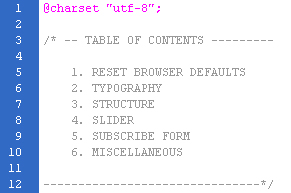
In order to change a particular style rule, you can quickly refer to the TABLE OF CONTENTS and then switch on to appropriate section.
Clickr uses 6 different javascript files for content enhancement and different features. These files are:
Let’s have a quick look on these files one by one:
1. Jquery library
jQuery is a javascript library that reduces the amount of code we must write. The file jquery-1.4.4.min.js is used commonly for all the plugins throughout the template. This file should be called in the top-most stack order in the head section. Failing to which, the plugins will not work correctly. You need not modify or change the content of this file.
2. Jquery Plugins
These are open source Jquery plugin files created by various developers worldwide. Although, you need not modify or edit these files, I shall mention the role of these files one by one:
3. Cufon font replacement
Clickr uses PT Sans font for displaying main heading. This font is rendered via Cufon font replacement tool. For Cufon font replacement, we require two files:
4. Miscellaneous
Custom.js: This file is used to initialize jquery cycle plugin. All settings related to slider can be found inside this file. You can control effects and animation speed using the parameters inside this file.
I have used the following files and images, as listed:
http://jquery.com/
Copyright 2010, John Resig
jQuery Cycle Plugin (with Transition Definitions)
Copyright (c) 2007-2009 M. Alsup
jQuery Easing v1.1 - http://gsgd.co.uk/sandbox/jquery.easing.php
Copyright (c) 2007 George Smith
Copyright (c) 2009 Simo Kinnunen.
Licensed under the MIT license.
@version 1.09
Copyright © 2009 ParaType Ltd. All rights reserved.
www.we-function.com, www.komodomedia.com
Once again, thank you so much for purchasing this template. As I said at the beginning, I'd be glad to help you if you have any questions relating to this template. No guarantees, but I'll do my best to assist. If you have a more general question relating to the themes on ThemeForest, you might consider visiting the forums and asking your question in the "Item Discussion" section.
Saurabh Sharma
